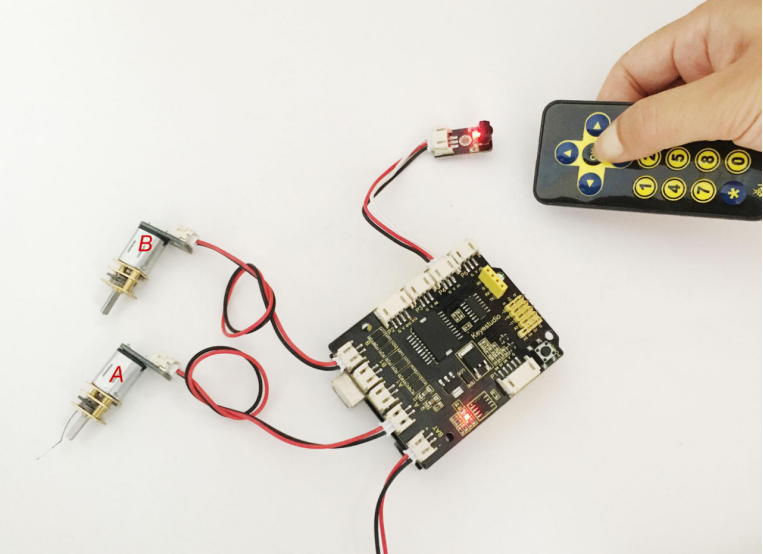
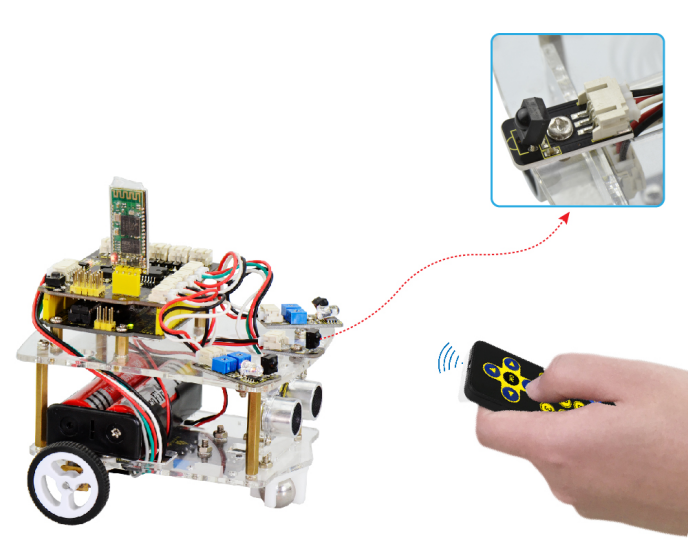
Project 10 IR Remote Control Smart Car
1.Principle
In the previous section, we have talked about how to control the state of an LED by IR remote control. So think in another side. If want to control a smart car by IR remote control, how can we achieve that? Actually it is very easy. The ARDUINO board is able to analyze and judge the infrared signals collected, finally drive the forward, backward and direction of motor.
In the previous part, we have showed you about the button value of an infrared remote control. Next just need to type those values in the test code of infrared remote control for smart car.
2.Wiring Diagram
You should first connect the circuit according to the wiring diagram below.
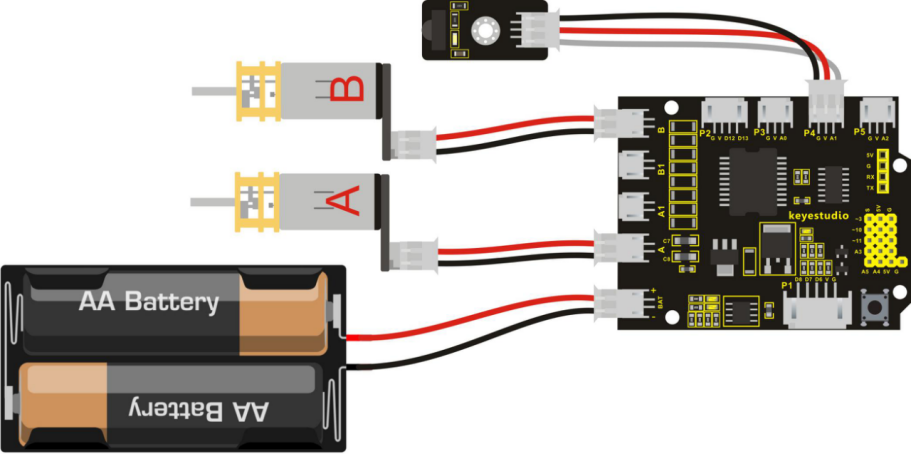
Let’s review the decoding value of buttons on the remote control again.
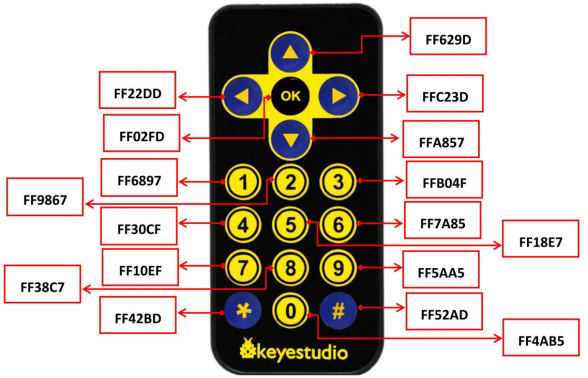
You can get the data information of buttons, such as: forward button 0x00FF629D; backward button 0x00FFA857; Stop button 0x00FF02FD; left turn button 0x00FF22DD; right turn button 0x00FFC23D.
These buttons information can be used to control the smart car go forward, backward, turn left or turn right, and stop. So in the following, we type these data into the program.
3.Example Program as below
Code 13
#include <IRremote.h> // libraries file
int RECV_PIN = 15;// connect receiver module to A1,that is D15 interface
int E1 = 9;   // set the speed pin of motor A as D9
int E2 = 5;   // set the speed pin of motor B as D5
int M1 = 2;   // set the direction pin of motor A as D2
int M2 = 4;   // set the direction pin of motor B as D4
long advance1 = 0x00FF629D;// set the forward button of car control
long back1 = 0x00FFA857;//  set the backward button of car control
long stop = 0x00FF02FD;//  set the Stop button of car control
long left = 0x00FF22DD;//  set the left turn button of car control
long right = 0x00FFC23D;//  set the right turn button of car control
IRrecv irrecv(RECV_PIN);
decode_results results; // used to save the decoding result

void setup(void)
{
  pinMode(RECV_PIN, INPUT);// set D15 as INPUT mode
  pinMode(M1,OUTPUT); // set M1 as OUTPUT mode
  pinMode(M2,OUTPUT); // set M2 as OUTPUT mode
  pinMode(E1,OUTPUT); //  set E1 as OUTPUT mode
  pinMode(E2,OUTPUT); //  set E2 as OUTPUT mode
  irrecv.enableIRIn();// initialize the infrared decoding
}

void advance(void)        // set the forward motion
{
  digitalWrite(M1,HIGH);  // motor A turns forward, car wheel goes forward.
  digitalWrite(M2,HIGH);  // motor B turns forward, car wheel goes forward.
  analogWrite(E1,150);    // speed of motor A(can be adjusted according to the actual speed of motor. Turn up the value to accelerate, lower the value to decelerate.)
  analogWrite(E2,150);    // speed of motor B(can be adjusted according to the actual speed of motor. Turn up the value to accelerate, lower the value to decelerate.)
}

void back(void)        // set the backward motion
{
  digitalWrite(M1,LOW);   // motor A turns reverse, car wheel goes backward.
  digitalWrite(M2, LOW);   // motor B turns reverse, car wheel goes backward.
  analogWrite(E1,150);     // speed of motor A
  analogWrite(E2,150);    // speed of motor B
}
void turnL(void)     // set the left turn motion
{
  digitalWrite(M1,LOW);    // motor A turns reverse, car wheel goes backward.
  digitalWrite(M2, HIGH);  // motor B turns forward, the wheels go forward, smart car turns left.
  analogWrite(E1,150);  // speed of motor A
  analogWrite(E2,150);  // speed of motor B
}

void turnR(void)            // set the right turn motion
{
   digitalWrite(M1,HIGH);   // motor A turns forward, wheels go forward.
   digitalWrite(M2,LOW);    // motor B turns reverse, wheels go backward, smart car turns right.
   analogWrite(E1,150);     // speed of motor A
   analogWrite(E2,150);    // speed of motor B
}

void stopp(void)   // set the Stop motion
{
   digitalWrite(M1,LOW);  // motor A turns reverse
   digitalWrite(M2, LOW);  //  motor B turns reverse
   analogWrite(E1, 0);      // speed of motor A, speed as zero, means Stop.
   analogWrite(E2, 0);      //  speed of motor B, speed as zero, means Stop.
}

void loop()
{
    if (irrecv.decode(&results))
    {
        if (results.value == advance1 )// If receive the command of forward button pressed
        	advance();// car goes forward
        if (results.value == back1 )// If receive the command of backward button pressed
        	back();//car goes backward
        if (results.value == left )//  If receive the command of leftbutton pressed
        	turnL();// car turns left
        if (results.value == right )//  If receive the command of right turn button pressed
        	turnR();// car turns right
        if (results.value == stop )//  If receive the command of Stop button pressed
        	stopp();// car stops
        irrecv.resume(); // receive next encode
   }
}
4.Example Result
Upload well the program to main board, then press down the POWER button on the motor drive shield lightly. Aimed at the IR receiver module, press any buttons on the remote control, you should see it control the motor, thus can control smart car run freely.